General Questions
What is ExisEcho?
ExisEcho is the world's most flexible and sophisticated fuzzy logic based deduplication system. It helps you find similar but not identical records in your data, making it perfect for data cleanup, master data management, fraud detection, and more.
What makes ExisEcho different from other deduplication tools?
ExisEcho stands out with:
- Unmatched Flexibility: 15+ configurable matching options per column
- Superior Speed: Proprietary algorithms process millions of records in minutes
- Wide Data Source Support: Connect to 9+ data sources out of the box
- Advanced Features: Phonetic matching, synonym support, regex filtering, and weighted scoring
What data sources does ExisEcho support?
ExisEcho supports a wide range of data sources:
- Files: Microsoft Excel (.xlsx, .xls), CSV, Microsoft Access (.mdb, .accdb)
- Databases: SQL Server, PostgreSQL, MySQL, SQLite
- Cloud: Google Sheets
- Generic: Any ODBC-compatible data source
Need a different data source? Contact us and we'll work with you to add it.
Does ExisEcho have an Excel add-in?
Yes! We offer a free ExisEcho Excel Add-in that lets you find fuzzy duplicates directly inside Microsoft Excel. It supports the same matching algorithms (trigram similarity, Jaro-Winkler, phonetic matching) and preprocessing options (synonym expansion, address abbreviations, etc.) as the full desktop application. The free tier supports up to 500 records per run with unlimited columns.
We also offer free Excel add-ins for US address geocoding, USPS address validation, and ZIP code lookup. All are available in the Microsoft Office Add-in Store.
Can I run ExisEcho on my own servers?
Yes! ExisEcho Docker is the self-hosted edition that runs entirely on your infrastructure. It bundles the full fuzzy matching API, admin UI, and a deployable Excel Add-in into a single Docker container (~86 MB). Your data never leaves your network, making it ideal for HIPAA, GDPR, and air-gapped environments. It includes a 14-day free trial with no feature limits. Get it from Docker Hub.
Features & Capabilities
What is fuzzy matching?
Fuzzy matching is a technique that finds strings that are approximately equal rather than exactly equal. For example, "John Smith" and "Jon Smyth" would be identified as potential matches even though they're spelled differently. This is essential for finding duplicates in real-world data where typos, abbreviations, and variations are common.
What fuzzy matching algorithms does ExisEcho use?
ExisEcho uses a sophisticated combination of fuzzy logic algorithms to achieve highly accurate matching:
- Trigram Similarity: Breaks text into overlapping 3-character sequences and compares the overlap between strings for robust fuzzy comparison
- Jaro-Winkler Similarity: Optimized for short strings like names, gives favorable ratings to strings that match from the beginning
- Soundex: Classic phonetic algorithm that encodes words by their sound, identifying similar-sounding names regardless of spelling
- Metaphone: Advanced phonetic algorithm that handles English pronunciation rules more accurately than Soundex
- Levenshtein Distance: Measures the minimum number of single-character edits (insertions, deletions, substitutions) needed to transform one string into another
These algorithms work together with configurable preprocessing options (synonym expansion, address abbreviation normalization, title removal, etc.) to deliver industry-leading match accuracy across diverse data types.
What is phonetic matching?
Phonetic matching identifies words that sound similar regardless of spelling. This is especially useful for names where multiple spellings exist (Smith/Smyth, John/Jon, Catherine/Katherine). ExisEcho uses advanced phonetic algorithms to catch these variations that simple string comparison would miss.
How do synonyms work?
ExisEcho allows you to define synonym dictionaries that treat different terms as equivalent:
- Names: Robert = Bob = Rob, William = Bill = Will
- Business: Corporation = Corp = Inc, Limited = Ltd
- Addresses: Street = St, Avenue = Ave, Road = Rd
You can customize the synonym list to match your specific industry or use case.
How does fuzzy logic address matching work?
Fuzzy logic address matching uses intelligent algorithms to identify addresses that refer to the same location despite differences in formatting, abbreviations, or typos. ExisEcho handles common address variations including:
- Abbreviations: "Street" vs "St", "Avenue" vs "Ave", "Boulevard" vs "Blvd", "Road" vs "Rd"
- Directional Variations: "North" vs "N", "Southwest" vs "SW"
- Unit Formatting: "Apartment 5" vs "Apt 5" vs "Apt. 5", "Suite" vs "Ste"
- Spelling Differences: Typos or phonetic misspellings in street or city names
- Word Order: "123 Main St Apt 4" vs "Apt 4, 123 Main St"
With built-in address abbreviation dictionaries, phonetic matching, and configurable synonym support, ExisEcho delivers highly accurate fuzzy logic address matching out of the box. You can also customize the abbreviation and synonym lists to fit your specific address data.
What matching options are available?
ExisEcho provides extensive configuration for each column:
- Character Matching: Require first N characters to match (or differ)
- Phonetic Match: Match words that sound alike
- Equate Synonyms: Treat synonymous terms as equivalent
- Remove Titles: Ignore Mr., Mrs., Dr., etc.
- Remove Punctuation: Strip punctuation before comparing
- Remove Articles: Ignore a, an, the
- Remove Custom Values: Your own list of words to ignore
- Remove Blanks: Eliminate all whitespace
- Remove Consecutive Blanks: Normalize multiple spaces
- Remove Numerics: Ignore numbers in text
- Remove Non-Numerics: Keep only numbers
- Case Sensitive: Require exact case matching
- Ignore Word Order: Match regardless of word sequence
- Column Weight: Assign importance (0.1 to 10.0)
How does weighted scoring work?
You can assign a weight (0.1 to 10.0) to each column to indicate its importance in determining matches. For example, you might give a weight of 5.0 to the "Name" column and 1.0 to the "City" column, making name matches much more significant in the final similarity score. This allows you to tune matching based on your specific requirements.
What is the similarity score?
The similarity score is a percentage (0-100%) indicating how similar two records are based on your configured matching options and column weights. You can set a threshold (e.g., 70%) to determine which record pairs are considered potential duplicates. Higher thresholds result in fewer but higher-confidence matches.
How do I review duplicates and export a unique list?
After running duplicate detection, click the "Review Duplicates & Export Unique List" button to open the interactive review screen. This powerful feature helps you create a clean, deduplicated dataset:
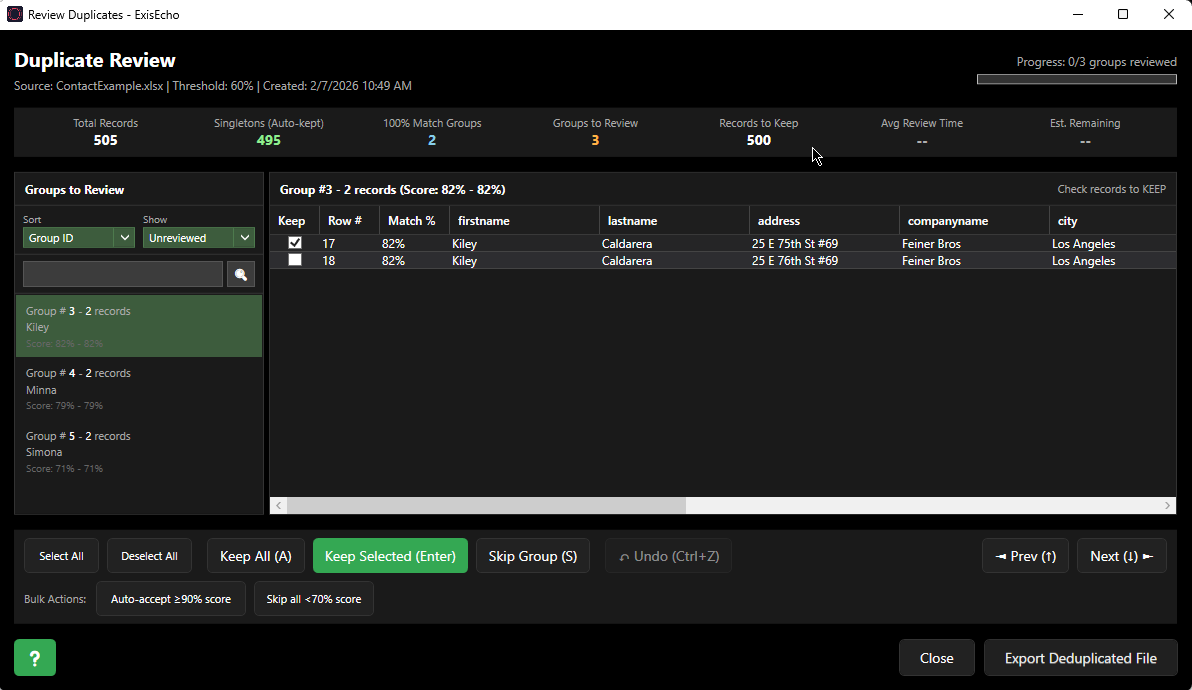
- Automatic categorization: Records are sorted into three categories—singletons (unique records), 100% matches (auto-merged), and groups needing manual review
- Smart pre-selection: The highest-scoring record in each group is automatically selected to keep
- Quick actions: Keep All, Keep Only Selected, or Skip Group with one click
- Bulk operations: Auto-accept groups above a threshold or skip multiple groups at once
- Search & filter: Find specific records across all groups, filter by review status, sort by score or size
- Include 100% matches: Optionally review groups with exact duplicates that are normally auto-processed
- Keyboard shortcuts: Speed through reviews with Enter/Space/S/D/K/J/Up/Down keys
- Progress tracking: Your progress is automatically saved—close and resume anytime
- Export: Generate a clean Excel or CSV file containing only the records you chose to keep
This interactive review workflow ensures you maintain full control over which records to keep while still benefiting from intelligent automation for clear-cut duplicates.
Technical Questions
How fast is ExisEcho?
ExisEcho uses proprietary indexing technology that enables extremely fast matching. Typical performance:
- 10,000 records: seconds
- 100,000 records: under a minute
- 1,000,000 records: a few minutes
Actual performance depends on the number of columns being matched and the matching options selected.
What are the system requirements?
- Windows 10 or Windows 11 (64-bit)
- .NET 8.0 Runtime (included in installer - no separate download needed)
- 4 GB RAM minimum (8 GB recommended for large datasets)
- 500 MB disk space
Can I use regex filters?
Yes! Each column supports regex (regular expression) filtering. You can extract specific patterns from your data before matching. For example, extract just the numeric portion of a phone number, or match only the first word of a company name. This powerful feature gives you precise control over what data is compared.
Licensing & Support
Is there a free trial?
Yes! We offer a 7-day free trial with full feature access. No credit card required. Download the trial to get started.
What's included in the Professional license?
- Unlimited record processing
- All data sources
- All matching features
- Priority email support
- Free updates for one year
- Export results to Excel
Do you offer enterprise licensing?
Yes! Enterprise licensing includes unlimited users, API access, custom integrations, dedicated support, on-premise deployment options, and custom data source development. Contact us for a custom quote.
How do I get support?
All licensed users receive email support. Professional users get priority response times. Enterprise customers receive dedicated support with SLAs. Contact us for assistance.
Still Have Questions?
Our team is here to help you find the right solution for your data challenges.
Contact Us